How to Install an eSIM on a Samsung Smartphone
Install an eSIM on Samsung A simple step-by-step guide to installing a travel eSIM on your Samsung Galaxy phone before your next overseas trip.

Install an eSIM on a Samsung smartphone is much easier than most travellers expect.
Instead of swapping tiny plastic SIM cards overseas, an eSIM lets you activate mobile data digitally in just a few minutes.
Install an eSIM on a Samsung Whether you’re travelling through Europe, Asia, the USA, or almost anywhere else in the world, a Roamzy travel eSIM helps you stay connected instantly when you land.
What Is an eSIM?
An eSIM is a digital SIM card built directly into your Samsung device.
Instead of inserting a physical SIM card, Install an eSIM on a Samsung, you simply install your mobile plan digitally using a QR code or setup details.
This allows travellers to connect to mobile networks around the world without visiting a SIM card shop or relying on expensive roaming.
Install an eSIM on a Samsung, Good News:
Most newer Samsung Galaxy smartphones already support eSIM technology.
Most newer Samsung Galaxy smartphones already support eSIM technology.
Install an eSIM on a Samsung,Which Samsung Phones Support eSIM?
Many modern Samsung devices include eSIM functionality.
Popular Samsung eSIM Compatible Phones
- Samsung Galaxy S20 Series
- Samsung Galaxy S21 Series
- Samsung Galaxy S22 Series
- Samsung Galaxy S23 Series
- Samsung Galaxy S24 Series
- Samsung Galaxy Z Fold devices
- Samsung Galaxy Z Flip devices
- Selected Galaxy Note devices
Before purchasing an eSIM, make sure your Samsung phone is:
- Unlocked
- Updated to the latest software version
- Connected to WiFi during setup
Before You Begin
After purchasing your Roamzy travel eSIM , you’ll receive a QR code by email.
You’ll need:
- Your Samsung smartphone
- A WiFi connection
- Your Roamzy QR code
Roamzy Tip:
Install your eSIM before leaving Australia so you can land connected instantly without searching for airport WiFi.
Install your eSIM before leaving Australia so you can land connected instantly without searching for airport WiFi.
Step-by-Step: Install an eSIM on Samsung
Step 1 — Open Settings
On your Samsung phone, open:
Settings → Connections
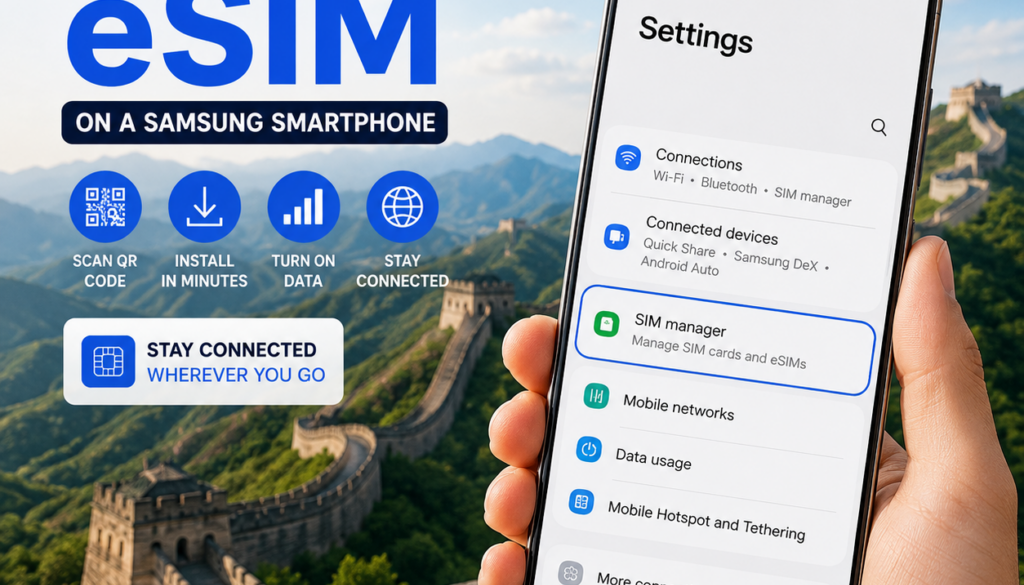
Step 2 — Open SIM Manager
Tap:
SIM Manager
You’ll now see your current SIM information and eSIM options.
Step 3 — Add eSIM
Tap:
Add eSIM
Then select:
Scan QR Code from Service Provider
Step 4 — Scan Your QR Code
Use your Samsung camera to scan the QR code sent by Roamzy.
Your phone should automatically detect the eSIM profile.
Step 5 — Download and Install
Tap:
Add → Download
Your Samsung device will now install the eSIM profile automatically.
Step 6 — Enable the eSIM
Once installed, make sure your Roamzy eSIM is switched ON inside SIM Manager.
Step 7 — Turn On Data Roaming
When you arrive overseas:
Settings → Connections → Mobile Networks → Data Roaming ON
Your phone should now connect automatically.
Can I Keep My Existing Phone Number?
Yes.
Most Samsung smartphones support Dual SIM, allowing you to use:
- Your normal SIM card for calls and texts
- Your Roamzy eSIM for travel data
This means apps like:
- Banking apps
- Google Maps
- Messenger
continue working normally while travelling.
Common Samsung eSIM Problems
QR Code Won’t Scan
- Check your internet connection
- Increase screen brightness
- Clean your camera lens
eSIM Not Connecting
- Ensure Data Roaming is ON
- Restart your phone
- Wait a few minutes after arriving
Phone Says eSIM Unsupported
Your device may be carrier locked or may not support eSIM in your region.
Why Travellers Love eSIMs
- No physical SIM swapping
- Instant setup
- Avoid expensive roaming charges
- Stay connected immediately
- Safer than public airport WiFi
Many travellers now prefer mobile data through eSIMs instead of unsecured public airport hotspots.
Cybersecurity agencies including Europol continue warning travellers about fake public WiFi networks and hotspot scams.
Helpful Roamzy Travel Guides
- First Time Using an eSIM?
- Travel eSIM Setup Guide
- Airport WiFi Safety Tips
- Europe eSIM Plans
- Roamzy Secure
Why Choose Roamzy?
At Roamzy, we make international travel connectivity simple.
- Fast QR code setup
- Affordable travel data
- Reliable global coverage
- Perfect for first-time eSIM users
- Travel-focused support
Frequently Asked Questions
Can I install an eSIM before travelling?
Yes. Most travel eSIMs can be installed before departure and activate once they connect to an overseas network.
Install an eSIM on a Samsung,Do Samsung phones support Dual SIM?
Most modern Samsung Galaxy devices support Dual SIM functionality using a physical SIM and an eSIM together.
Is using an eSIM safer than airport WiFi?
Generally yes. Mobile networks are typically more secure than public shared WiFi hotspots.
Do I need internet to install my eSIM?
Yes. You’ll need a WiFi or internet connection during installation.
Final Thoughts
Installing an eSIM on your Samsung smartphone is one of the easiest ways to stay connected while travelling internationally.
Once installed, your Roamzy eSIM allows you to access maps, transport apps, accommodation bookings, and messaging services instantly when you land.
With Roamzy, you can avoid expensive roaming fees and travel with confidence knowing you’ll stay connected wherever your journey takes you.
🌍 Ready to travel connected with your Samsung phone?
Ready to Install Your Samsung eSIM?
Get connected in minutes with Roamzy travel eSIMs and avoid expensive roaming while travelling overseas.
Shop Roamzy eSIMs